在win电脑操作
cd C:\Users\Rx\.ssh
ssh-keygen -t rsa -b 4096 -C "你的注释,比如:win11-to-ubuntu-vm"
# 查看公钥
cat C:\Users\Rx/.ssh/自定义名字.pub
-t rsa:指定密钥类型为 RSA -b 4096:指定密钥长度为 4096 位(更安全) -C:添加注释,帮助识别这个密钥的用途 可以生成不同key,需要起不同名字。
在ubuntu操作
# 创建 .ssh 目录(如果不存在)
mkdir -p ~/.ssh
# 设置正确的权限
chmod 700 ~/.ssh
# 将公钥添加到授权文件,必须是完整的字符串
echo "xxx.pub公钥内容" >> ~/.ssh/authorized_keys
# 设置授权文件权限
chmod 600 ~/.ssh/authorized_keys
# 手动登录
ssh -i C:\Users\Rx\.ssh\new_api root@192.168.3.211
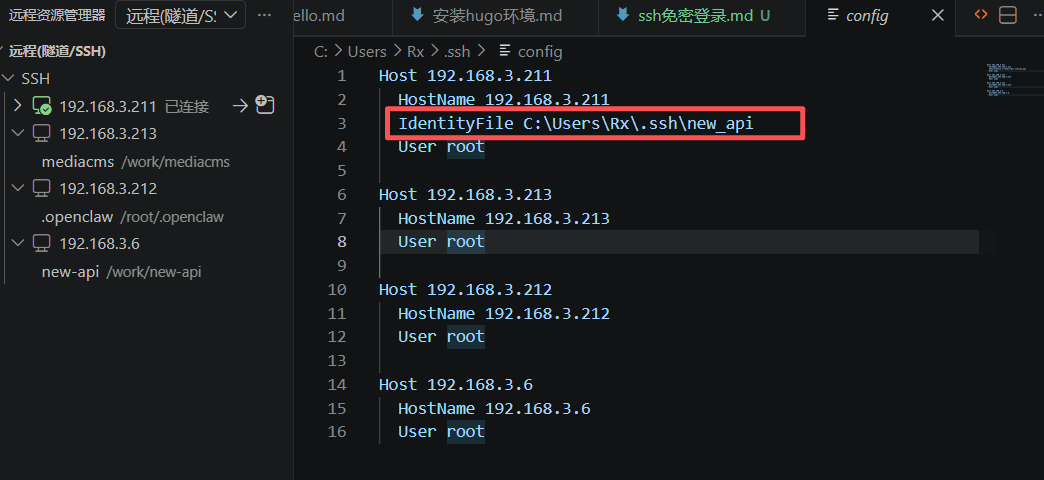
修改C:\Users\Rx.ssh\config文件,指向实际私钥地址。 vscode默认生成的路径有误,不要使用。